
How to Automate LinkedIn Without Getting Banned: The 2026 Playbook
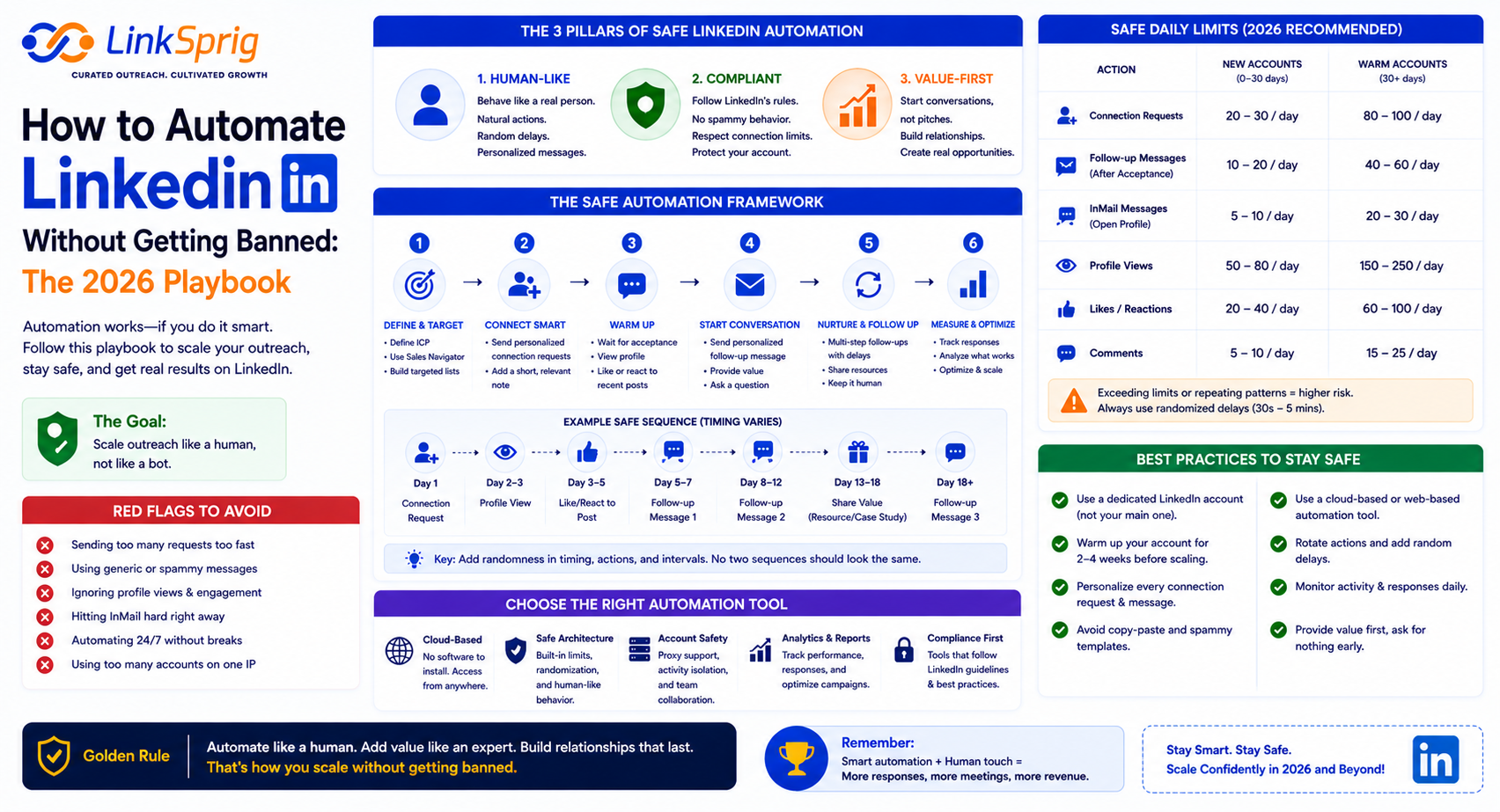
LinkedIn has solidified itself as the ultimate B2B lead generation powerhouse. However, manual outreach is notoriously difficult to scale. As sales teams turn to automation to streamline their pipelines, they face a looming threat: the dreaded LinkedIn jail. If you have ever wondered how to automate LinkedIn without getting banned, you are not alone. In 2026, over 85% of B2B outbound teams rely on some form of automation, yet thousands of accounts are restricted weekly due to poor practices. This guide will walk you through the exact technical safeguards and strategic steps required to scale your outreach safely and sustainably.
Understanding LinkedIn’s Detection Algorithm in 2026
To safely automate your B2B campaigns, you must first understand how LinkedIn identifies automated behavior. LinkedIn’s security infrastructure relies on sophisticated machine learning models designed to flag non-human activity. There are three primary triggers that lead to account restriction:
- Unnatural Activity Spikes: Going from 5 messages a day to 150 overnight is a massive red flag.
- Browser Extension Footprints: Legacy tools inject code directly into your browser DOM, which LinkedIn’s security scripts can easily detect.
- IP Address Mismatches: Logging into your account from New York while an automation tool accesses it from an AWS server in Dublin raises immediate fraud alerts.
Recent data from 2026 shows that accounts utilizing client-side browser extensions face a 42% higher restriction rate compared to those using dedicated cloud-based solutions with residential proxies. To bypass these checks, your automation footprint must look identical to a real human user browsing the web.
The Golden Rules of Safe LinkedIn Automation Limits
The secret to learning how to automate LinkedIn without getting banned lies in strict volume control and behavioral randomization. If your outreach mimics a machine, you will be treated like one. To keep your account safe, adhere to these operational boundaries:
1. Implement a Gradual Warm-Up Phase
Never launch a high-volume campaign on day one. If your account is new or has been inactive, start with 5 connection requests and 10 messages per day. Increase this volume by 10% to 15% weekly until you reach your target velocity. This gradual warm-up builds account authority and signals natural organic growth to LinkedIn’s monitoring systems.
2. Keep Daily Actions Within Safe Thresholds
Even with a warmed-up account, you must respect LinkedIn’s weekly search and connection limits. In 2026, the safest daily limits for premium accounts (Sales Navigator) are:
- Connection Requests: 20 to 25 per day (maximum of 100 to 120 per week).
- InMails (Paid & Free): 15 to 20 per day.
- Profile Views: 40 to 50 per day to trigger natural reciprocal views.
- Follow-up Messages: 30 to 40 per day to existing connections.
3. Randomize Human Delays
Ensure your automation platform features randomized delays between actions. A human does not send a message exactly every 60 seconds. Your software should wait 73 seconds for one action, 142 seconds for the next, and pause entirely during non-business hours.
Cloud-Based Automation vs. Browser Extensions
The debate between browser extensions and cloud-based platforms is over. If you want to protect your personal brand and sales pipeline, cloud-based automation is the only viable path forward. Browser extensions run locally on your machine, hijacking your active browser session. This leaves a distinct digital fingerprint that LinkedIn can scan via its regular security updates.
In contrast, cloud-based tools run on dedicated virtual private servers (VPS). When configured with a dedicated, localized residential proxy that matches your actual physical location, the automation runs in the background without modifying your local browser’s code. This setup ensures that even if your computer is turned off, your outreach continues safely at a human pace. Investing in a cloud-based architecture reduces your platform risk by over 90%, making it the cornerstone of any modern outbound sales stack.
A Tactical Workflow for Safe, High-Converting Campaigns
Safe automation is not just about avoiding bans; it is also about maximizing conversion rates. High-quality personalization reduces spam reports, which are a major trigger for manual account reviews. Follow this workflow to build a safe, high-yield campaign:
- Step 1: Hyper-Target Your Audience: Use Sales Navigator to build highly refined lists of under 1,000 prospects. Smaller, highly targeted lists prevent you from sending generic, spammy messages to irrelevant contacts.
- Step 2: Leverage AI-Driven Personalization: Instead of using basic placeholders like ‘Hi {{first_name}}’, use advanced AI engines to reference recent post activity, mutual connections, or company news. This ensures your messages read as genuine, custom-crafted notes.
- Step 3: Monitor Your Pending Sent Invitations: Keep your pending connection requests below 500. A high volume of unanswered invites signals to LinkedIn that you are spamming random users. Clean up unaccepted invites older than 14 days weekly.
By combining hyper-targeted lists with a cloud-based, randomized automation engine, you can expect connection acceptance rates to jump from a mediocre 15% to over 45%, while keeping your account completely secure.
Frequently Asked Questions
- Is LinkedIn automation illegal?
- No, it is not illegal, but it does violate LinkedIn’s User Agreement. This is why using safe, cloud-based platforms that mimic human behavior is critical to avoid account restriction.
- What should I do if my LinkedIn account gets restricted?
- If you receive a temporary restriction, stop all automation immediately. Wait out the restriction period (usually 24-48 hours), clear your browser cache, and when you resume, cut your daily volume in half while switching to a secure, cloud-based tool.
- Does having LinkedIn Premium or Sales Navigator protect my account?
- Yes, premium accounts are granted higher action thresholds and are scrutinized less aggressively than free accounts. However, they are not immune to bans if you violate basic safety limits.
